Developer Guide
- Acknowledgements
- Setting up, getting started
- Design
- Implementation
-
Planned Enhancements
- Allow users to add / delete tags without retyping previous tags
- Allow users to create and edit a member/event with name containing non-alphanumeric characters
- Allow users to delete values from optional fields in member/event/enrolment
- Make UI stay on current view upon editMember or editEvent
- Show a more specific error message for negative index in
editMember,editEvent,viewMember,viewEvent,deleteMemberanddeleteEvent - Provide more specific index error messages to the user
- Improve
findMember/findEventcriteria - Make UI stay on current view upon undo/redo
- Provide specific error messages for unknown prefixes
- Documentation, logging, testing, configuration, dev-ops
- Appendix A: Requirements
- Appendix B: Instructions for manual testing
- Appendix C: Effort
Acknowledgements
- The Undo/Redo feature was inspired by Address Book Level 4.
- The Command History feature was inspired by Tutor’s Pet.
- The Theme-switching feature was adapted by Tutor’s Pet.
- The table of content styling was adapted from Stackoverflow.
- The kbd styling was reused from Wikipedia.
Setting up, getting started
Refer to the guide Setting up and getting started.
Design
 Tip: The
 .puml files used to create diagrams in this document docs/diagrams folder. Refer to the PlantUML Tutorial at se-edu/guides to learn how to create and edit diagrams.
Architecture
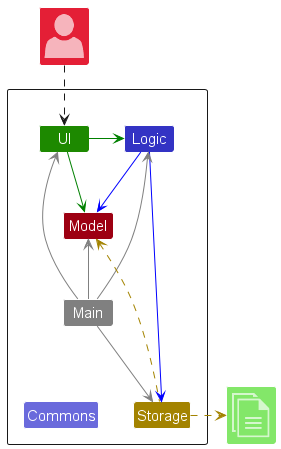
The Architecture Diagram given above explains the high-level design of the App.
Given below is a quick overview of main components and how they interact with each other.
Main components of the architecture
Main (consisting of classes Main and MainApp) is in charge of the app launch and shut down.
- At app launch, it initializes the other components in the correct sequence, and connects them up with each other.
- At shut down, it shuts down the other components and invokes cleanup methods where necessary.
The bulk of the app’s work is done by the following four components:
-
UI: The UI of the App. -
Logic: The command executor. -
Model: Holds the data of the App in memory. -
Storage: Reads data from, and writes data to, the hard disk.
Commons represents a collection of classes used by multiple other components.
How the architecture components interact with each other
The Sequence Diagram below shows how the components interact with each other for the scenario where the user issues the command deleteMember 1.
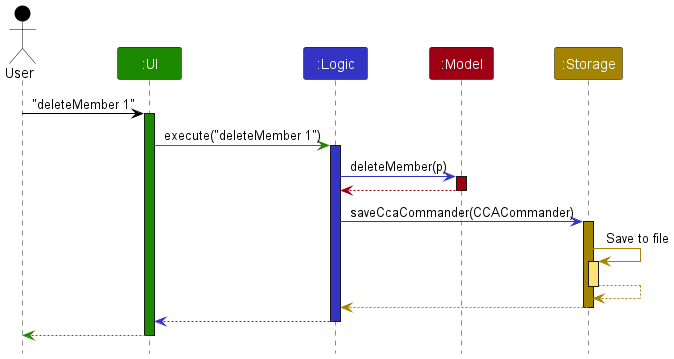
Each of the four main components (also shown in the diagram above),
- defines its API in an
interfacewith the same name as the Component. - implements its functionality using a concrete
{Component Name}Managerclass (which follows the corresponding APIinterfacementioned in the previous point).
For example, the Logic component defines its API in the Logic.java interface and implements its functionality using the LogicManager.java class which follows the Logic interface. Other components interact with a given component through its interface rather than the concrete class (reason: to prevent outside component’s being coupled to the implementation of a component), as illustrated in the (partial) class diagram below.
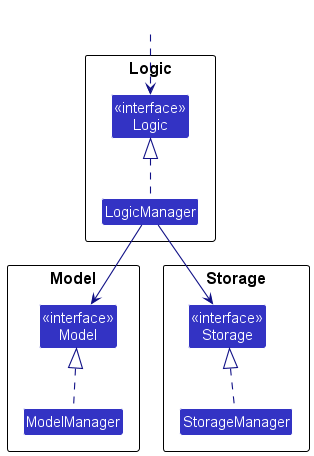
The sections below give more details of each component.
UI component
The API of this component is specified in Ui.java
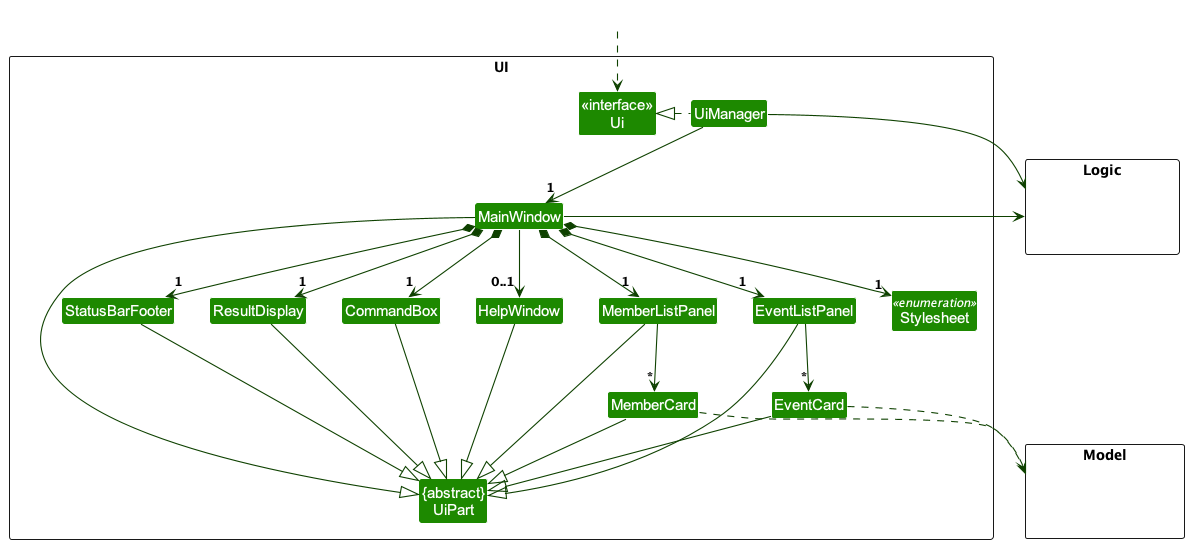
The UI consists of a MainWindow that is made up of parts e.g.CommandBox, ResultDisplay, MemberListPanel, StatusBarFooter etc. All these, including the MainWindow, (but excluding Stylesheet) inherit from the abstract UiPart class which captures the commonalities between classes that represent parts of the visible GUI.
The UI component uses the JavaFx UI framework. The layout of these UI parts are defined in matching .fxml files that are in the src/main/resources/view folder. For example, the layout of the MainWindow is specified in MainWindow.fxml
The UI component,
- executes user commands using the
Logiccomponent. - listens for changes to
Modeldata so that the UI can be updated with the modified data. - keeps a reference to the
Logiccomponent, because theUIrelies on theLogicto execute commands. - depends on some classes in the
Modelcomponent, as it displaysMemberandEventobjects residing in the Model
Logic component
API : Logic.java
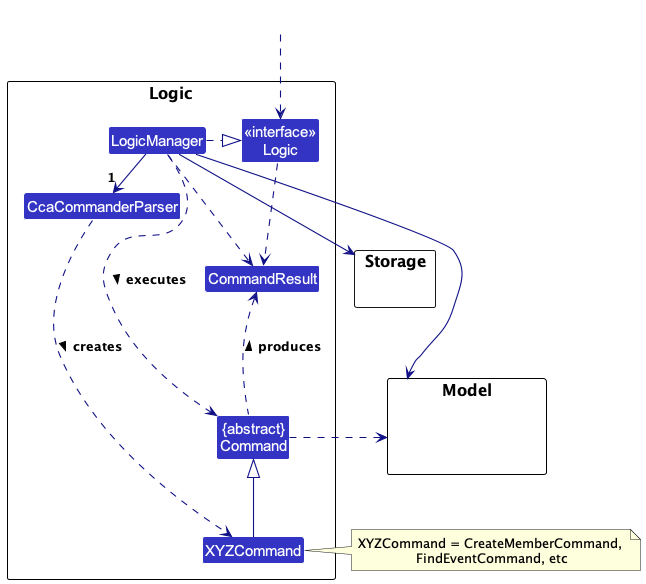
Here’s a (partial) class diagram of the Logic component:
The sequence diagram below illustrates the interactions within the Logic component, taking execute("deleteMember 1") API call as an example.
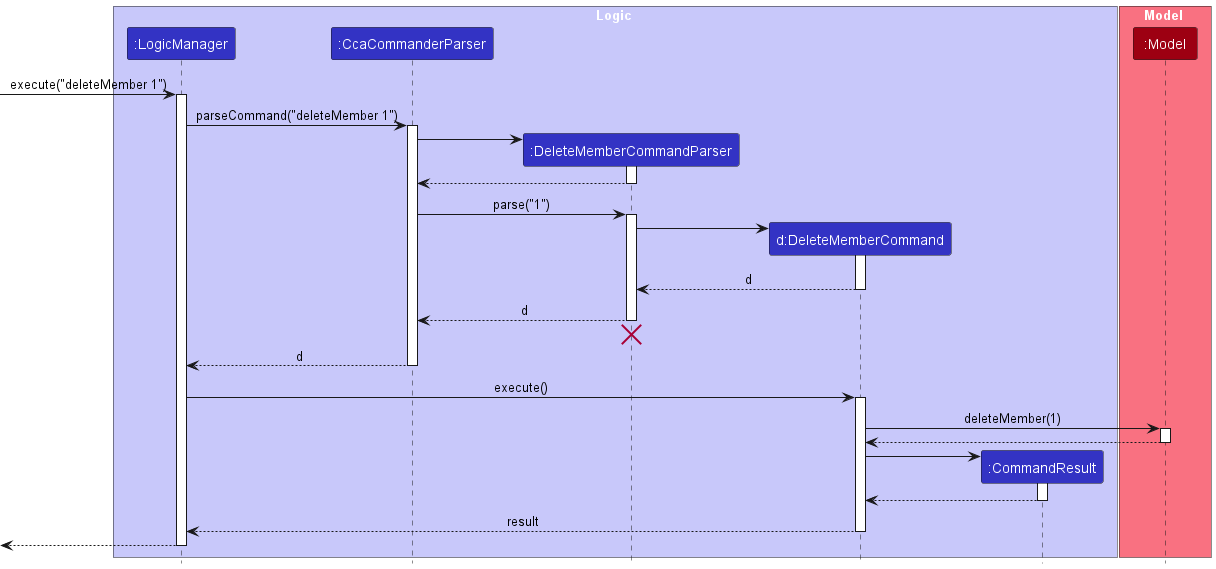
 Note: The lifeline for
 DeleteMemberCommandParser should end at the destroy marker (X) but due to a limitation of PlantUML, the lifeline reaches the end of diagram.
How the Logic component works:
- When
Logicis called upon to execute a command, it is passed to anCCACommanderParserobject which in turn creates a parser that matches the command (e.g.,DeleteMemberCommandParser) and uses it to parse the command. - This results in a
Commandobject (more precisely, an object of one of its subclasses e.g.,DeleteMemberCommand) which is executed by theLogicManager. - The command can communicate with the
Modelwhen it is executed (e.g. to delete a member). - The result of the command execution is encapsulated as a
CommandResultobject which is returned back fromLogic.
Here are the other classes in Logic (omitted from the class diagram above) that are used for parsing a user command:
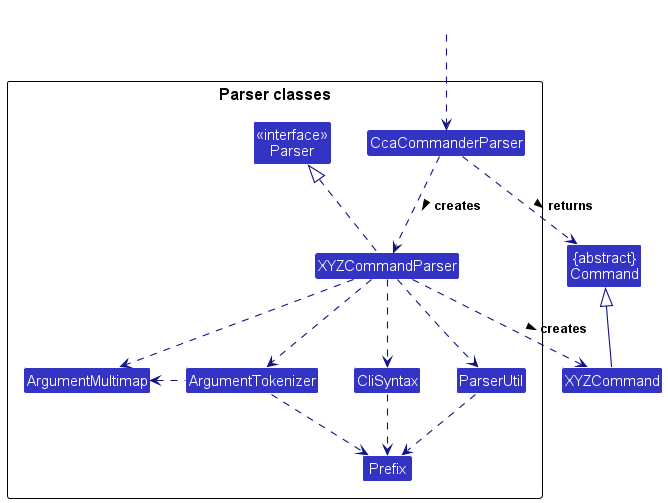
How the parsing works:
- When called upon to parse a user command, the
CcaCommanderParserclass creates anXYZCommandParser(XYZis a placeholder for the specific command name e.g.,CreateMemberCommandParser) which uses the other classes shown above to parse the user command and create aXYZCommandobject (e.g.,CreateMemberCommand) which theCcaCommanderParserreturns back as aCommandobject. - All
XYZCommandParserclasses (e.g.,CreateMemberCommandParser,DeleteMemberCommandParser, …) inherit from theParserinterface so that they can be treated similarly where possible e.g, during testing.
Model component
API : Model.java
- The class diagram below gives an overview of the model package.
Details of theMember,Event, andEnrolmentpackages have be omitted for brevity. Please refer to the Member, Event and Enrolment diagrams for more information.
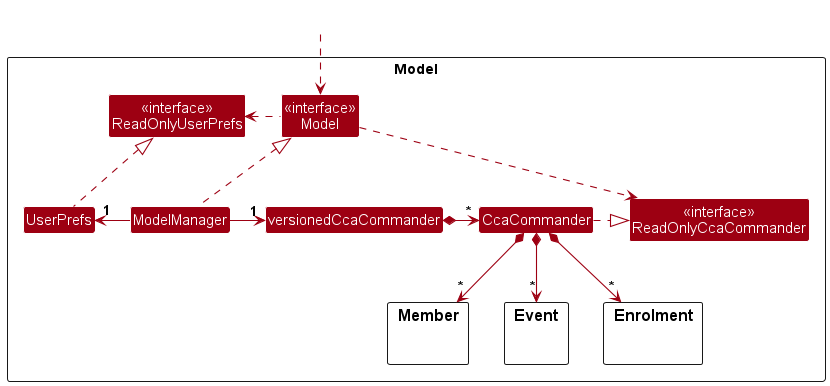
The Model component,
- stores the CCACommander data i.e., all
Memberobjects (which are contained in aUniqueMemberListobject). - stores the currently ‘selected’
Memberobjects (e.g., results of a search query) as a separate filtered list which is exposed to outsiders as an unmodifiableObservableList<Member>that can be ‘observed’ e.g. the UI can be bound to this list so that the UI automatically updates when the data in the list change. - stores
EventandEnrolmentobjects in a similar way to theMemberobjects. - stores a
UserPrefobject that represents the user’s preferences. This is exposed to the outside as aReadOnlyUserPrefobjects. - does not depend on any of the other three components (as the
Modelrepresents data entities of the domain, they should make sense on their own without depending on other components)
Storage component
API : Storage.java
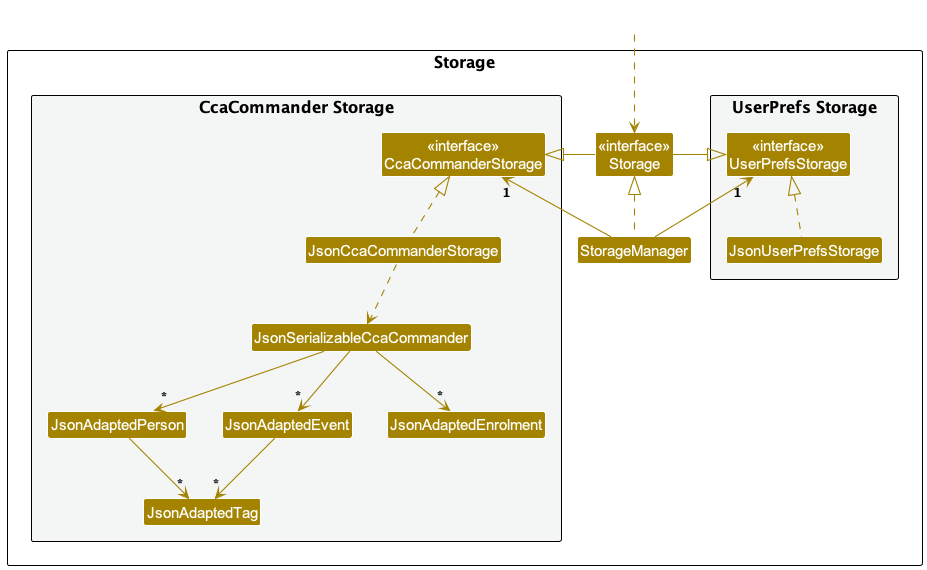
The Storage component,
- can save both CCACommander data and user preference data in JSON format, and read them back into corresponding objects.
- inherits from both
CcaCommanderStorageandUserPrefStorage, which means it can be treated as either one (if only the functionality of only one is needed). - depends on some classes in the
Modelcomponent (because theStoragecomponent’s job is to save/retrieve objects that belong to theModel)
Common classes
Classes used by multiple components are in the seedu.ccacommander.commons package.
Implementation
This section describes some noteworthy details on how certain features are implemented.
Member Model
This section explains how the Member model is implemented and the various design consideration when
implementing this model.
The class diagram below shows the current implementation of Member model.
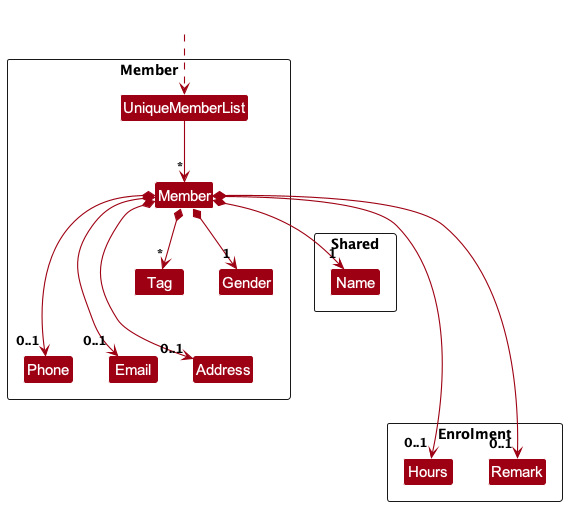
Every Member contains a Name, Gender, Optional<Phone>, Optional<Email>, Optional<Address>, Optional<Hours>, Optional<Remark> and a set of Tags. UniqueMemberList stores all unique instances of Member.
Note that the Hours and a Remark fields will only be meaningfully initialised
when either viewMember or viewEvent command is called. Hence, these two fields are only tools for UI related purposes.
Design Considerations
This section elaborates further on why we chose to adopt a Name over other potential
solutions.
Aspect: How to uniquely identify Members across models.
-
Alternative 1 (current choice): Ensure that each
Membermust have a uniqueName- Pros:
- This is convenient to implement as each
Memberentity will have aNamefield attached to it. - Using a name is intuitive for users, as individuals are typically identified by their names.
- This approach simplifies user interaction and search functionality, as names are commonly used identifiers.
- Overall, names are easier to manage and communicate compared to complex alphanumeric identifiers.
- This is convenient to implement as each
- Cons:
- Limits scalability, as the pool of available names may be finite.
- Prone to errors if there is insufficient validation, leading to the possibility of duplicate names.
- Susceptible to changes in personal information, such as name modifications, requiring additional handling for related entities such as
Enrolment.
- Pros:
-
Alternative 2 : Introduce a
UUIDattribute for eachMember.- Pros:
-
UUIDis immutable.
-
- Cons:
- The implementation process is intricate, requiring careful integration of the UUID field into the
Membermodel and the establishment of equality checks in CCACommander based on UUID. - There exists a potential risk of
UUIDcollisions when dealing with substantial amounts of member data generated by randomUUIDgeneration. More so whenEventwould also useUUIDif we integrateUUIDinMember.
- The implementation process is intricate, requiring careful integration of the UUID field into the
- Pros:
Event Model
This section explains how the Event model is implemented and the various design consideration when
implementing this model.
The Event and UniqueEventList classes are implemented as shown in the diagram below:
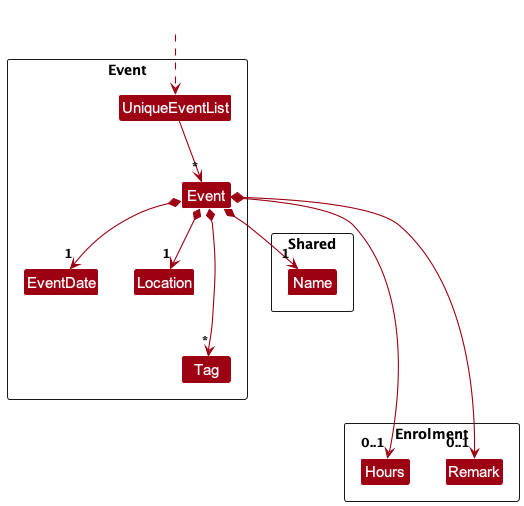
Every Event contains a Name, Location, EventDate, Optional<Hours>, Optional<Remark> and a set of Tags.
UniqueEventList stores all unique instances of Event.
Note that similar to Member class , the Hours and a Remark fields will only be meaningfully initialised
when either viewMember or viewEvent command is called. Hence, these two fields are only tools for UI related purposes.
Design Considerations
This section elaborates further on why we chose to adopt a Name over other potential
solutions.
Aspect: How to uniquely identify Events across models.
-
Alternative 1 (current choice): Ensure that each
Eventmust have a uniqueName- Pros:
- This is convenient to implement as each
Evententity will have aNamefield attached to it. - This approach will ensure consistency with the Member class by both utilizing Name as the identifier.
- This approach simplifies user interaction and search functionality, as names are commonly used identifiers.
- Overall, names are easier to manage and communicate compared to complex alphanumeric identifiers.
- This is convenient to implement as each
- Cons:
- Limits scalability, as the pool of available names may be finite.
- Prone to errors if there is insufficient validation, leading to the possibility of duplicate names.
- Susceptible to changes in personal information, such as name modifications, requiring additional handling for related entities such as
Enrolment.
- Pros:
-
Alternative 2 : Introduce a
UUIDattribute for eachEvent.- Pros:
-
UUIDis immutable.
-
- Cons:
- The implementation process is intricate, requiring careful integration of the UUID field into the
Eventmodel and the establishment of equality checks in CCACommander based on UUID. - There exists a potential risk of
UUIDcollisions when dealing with substantial amounts of event data generated by randomUUIDgeneration.
- The implementation process is intricate, requiring careful integration of the UUID field into the
- Pros:
Enrolment Model
This section explains how the Enrolment model is implemented and the various design consideration when
implementing this model.
Implementation
The Enrolment and UniqueEnrolmentList classes are implemented as shown in the diagram below:
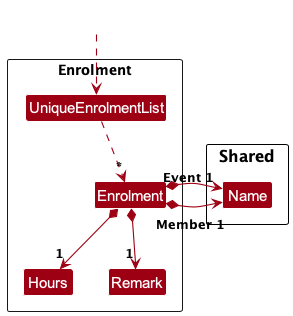
Enrolment encapsulates the enrolment of a member into an event. It composes of the Name of the member and
the Name of the event enrolled in, number of Hours they contributed, and a Remark to note for that
enrolment. UniqueEnrolmentList stores all unique instances of Enrolment.
Design considerations:
Aspect: How to store each member’s events and each event’s members.
-
Alternative 1 (current choice): Saves the enrolments as an independent list.
- Pros:
- Easy to implement.
- Less performance issues when loading and storing enrolments.
- Cons:
- Incur high performance cost when viewing members of event or events of member.
- Pros:
-
Alternative 2: Each member or event has its own list of enrolments.
- Pros:
- Linear time to view members of event or events of members.
- Cons:
- Hard to implement.
- Will encounter more difficulties when implementing other features related to enrolment.
- Pros:
Alternative 1 was chosen as the benefit of having a simple design outweighs the cost of having a higher performance overhead when viewing members of event or events of member. Alternative 2 has multiple layers of complexities that are difficult to navigate and this will compound when dealing with other features related to enrolment. The simpler design of alternative 1 also allows for more rigorous testing.
Enrol Feature
The enrol feature allows users to link a member to an event in order to keep track of their enrolment and contributions to the event.
This section will explain how the enrol feature was implemented and the various design considerations when implementing the feature.
Implementation
The enrolment mechanism is facilitated by EnrolCommand. It extends Command.
The method, EnrolCommand#execute(Model model), performs a validity check and adds a member’s enrolment for a particular event if
all the supplied parameters are valid.
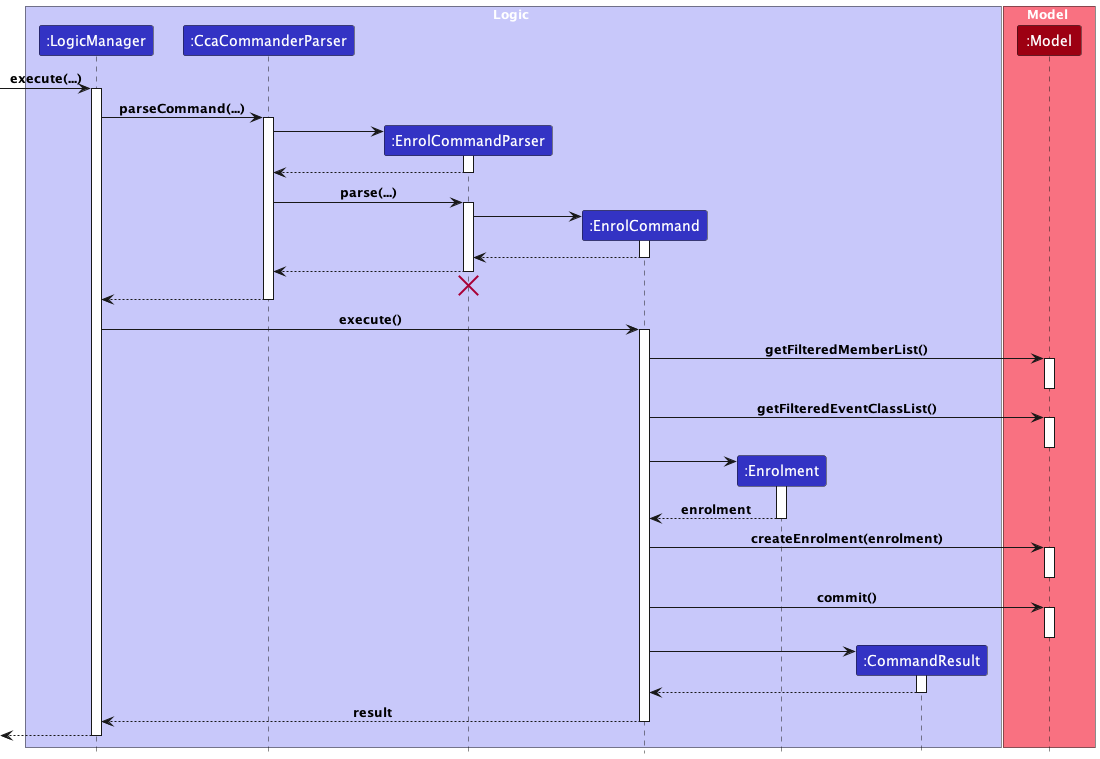
The sequence diagram below shows how the Model and LogicManager components interact when a EnrolCommand is executed with user input
enrol m/1 e/1 h/1 r/Role: Photographer represented by ...
-
LogicManageruses theCcaCommanderParserclass to parse the user command, creating a new instance ofEnrolCommandParserobject. - The
EnrolCommandParsercreates a new instance of aEnrolCommandobject and returns it toCcaCommanderParser -
CcaCommanderParserencapsulates theEnrolCommandobject as aCommandobject which is executed by theLogicManager. - The command execution calls
Model#getFilteredMemberList()andModel#getFilteredEventList()to get the desiredmemberandeventrespectively using indexes supplied by the user. - Next, the command execution creates a new instance of an
Enrolmentobject. -
Model#createEnrolment()is then called, adding the newEnrolmentobject to theuniqueEnrolmentListobject inmodel. - The change resulting from the command’s execution is saved using the
Model#commit(String commitMessage)method for theundo/redofeature. - A
CommandResultobject which encapsulates the result of the command execution is passed back to theUi.
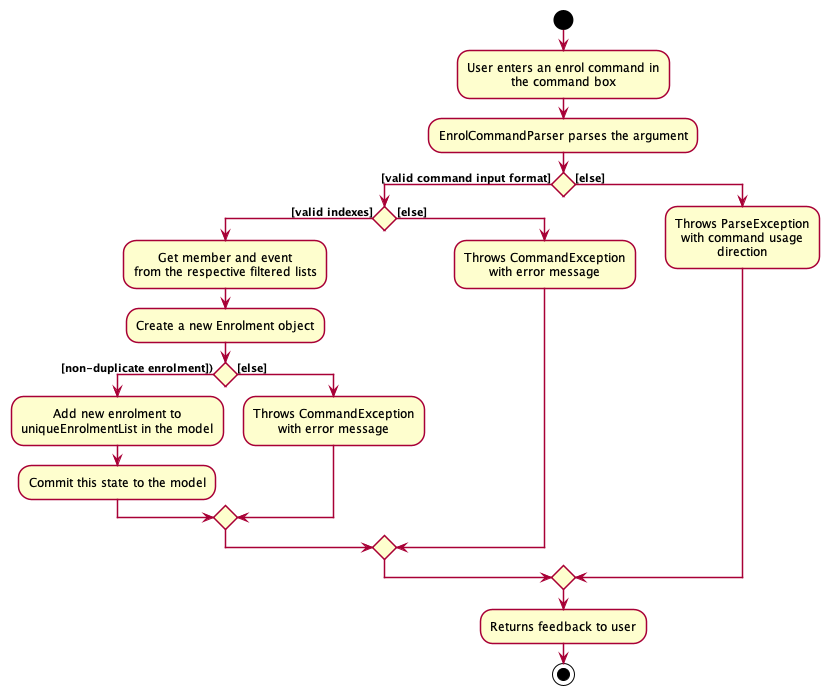
The following activity diagram shows how the EnrolCommand works.
Design Considerations
Aspect: EnrolCommand parameters
-
Alternative 1 (current choice):
EnrolCommandhas parametersName memberName,Name eventName,Hours hoursandRemark remark.- Pros:
- Less complex code reduces the possibility of bugs.
- Reduced coupling, enhancing maintainability
- Cons:
- Not standardised with other creation commands.
- Pros:
-
Alternative 2:
EnrolCommandhas parameterEnrolment enrolment- Pros:
- Standardised with other creation commands
- Cons:
- More complex code leading to higher possibility of bugs.
- Increased coupling, reducing maintainability.
- Pros:
Alternative 1 was chosen because the cons of implementing alternative 2 outweighs the benefits derived from it. Alternative 2
would require EnrolCommandParser to have knowledge of the Model. This would result in an increased coupling as it would
then have greater dependence on more modules. Hence, while Alternative 1 would result in the EnrolCommand to be not standardised
with other create commands, it provides a simpler implementation with fewer changes needed while also maintaining ease of testing.
Undo/Redo Feature
The Undo/Redo feature allows the user to revert commands that were entered wrongly.
This section will explain how the redo and undo features were implemented and the various design considerations when implementing the feature.
Implementation
The undo/redo mechanism is facilitated by VersionedCcaCommander. It extends CcaCommander with an undo/redo history, stored internally as an ccaCommanderVersionList and versionPointer. Additionally, it implements the following operations:
-
VersionedCcaCommander#commit(String commitMessage)— Saves the current CCACommander version and its commit message in its history. -
VersionedCcaCommander#undo()— Restores the previous CCACommander version from its history. -
VersionedCcaCommander#redo()— Restores a previously undone CCACommander version from its history.
These operations are exposed in the Model interface as Model#commit(), Model#undo() and Model#redo() respectively.
Given below is an example usage scenario and how the undo/redo mechanism behaves at each step.
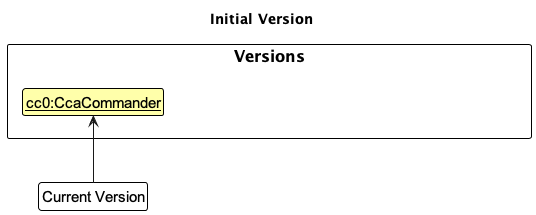
Step 1. The user launches the application for the first time. The VersionedCcaCommander will be initialized with the initial CCACommander version, and the versionPointer pointing to that single CCACommander version. This initial CCACommander version will be saved into the ccaCommanderVersionList
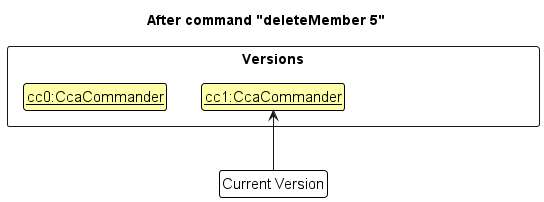
Step 2. The user executes deleteMember 5 command to delete the 5th member in CCACommander. The deleteMember command calls Model#commit(String commitMessage), causing the modified version of the CCACommander after the deleteMember 5 command executes to be saved in the ccaCommanderVersionList, and the versionPointer is shifted to the newly inserted CCACommander version.
Step 3. The user executes createMember n/David … to add a new member. The createMember command also calls Model#commit(String commitMessage), causing another modified CCACommander version to be saved into the ccaCommanderVersionList.
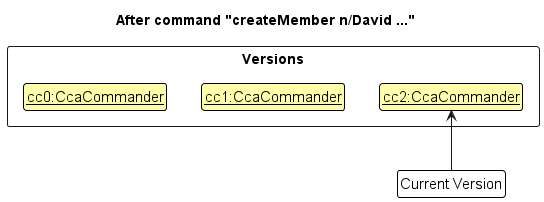
Note: If a command fails its execution, it will not call Model#commit(String commitMessage), so the CCACommander version will not be saved into the ccaCommanderVersionList.
Step 4. The user now decides that adding the member was a mistake, and decides to undo that action by executing the undo command. The undo command will call Model#undo(), which will shift the versionPointer once to the left, pointing it to the previous CCACommander version, and restores the CCACommander to that version.
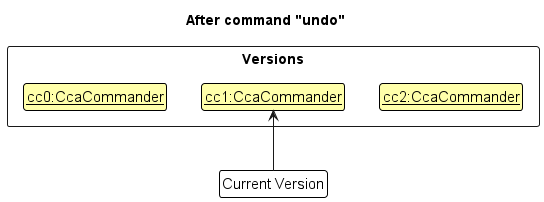
Note: If the versionPointer is at index 0, pointing to the initial CcaCommander version, then there are no previous CcaCommander versions to restore. The undo command uses Model#canUndo() to check if this is the case. If so, it will return an error to the user rather
than attempting to perform the undo.
The following sequence diagram shows how the undo operation works:
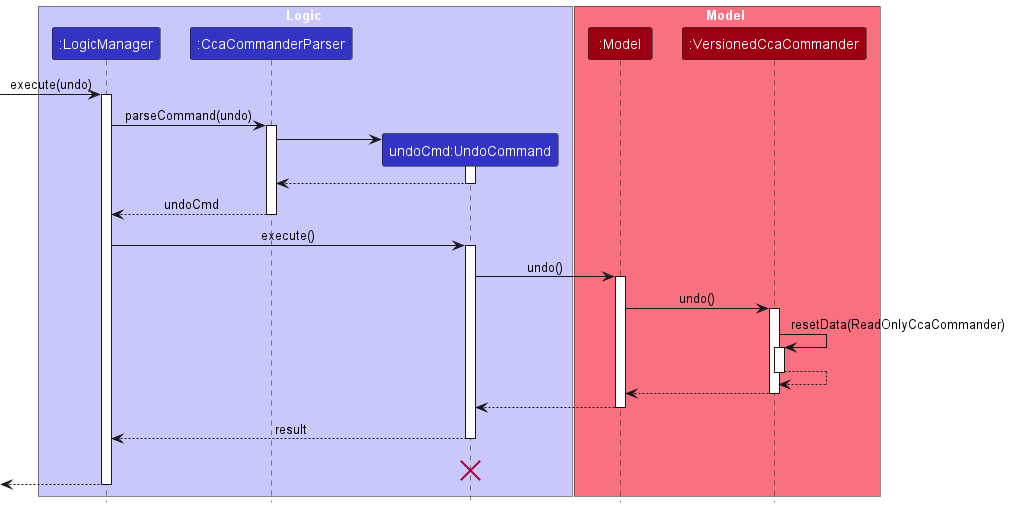
Note: The lifeline for UndoCommand should end at the destroy marker (X) but due to a limitation of PlantUML, the lifeline reaches the end of diagram.
The redo command does the opposite — it calls Model#redo(), which shifts the versionPointer once to the right, pointing to the previously undone version, and restores CCACommander to that version.
Note: If the versionPointer is at index ccaCommanderVersionList.size() - 1, pointing to the latest CCACommander version, then there are no undone CcaCommander versions to restore. The redo command uses Model#canRedo() to check if this is the case. If so, it will return an error to the user rather than attempting to perform the redo.
Step 5. The user then decides to execute the command list. Commands that do not modify the CCACommander, such as list, will usually not call Model#commit(String commitMessage), Model#undo() or Model#redo(). Thus, the ccaCommanderVersionList remains unchanged.
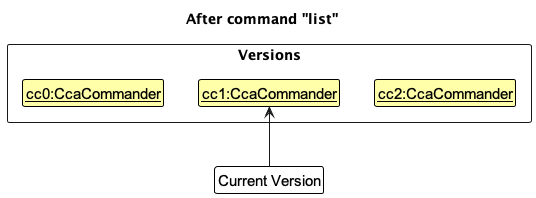
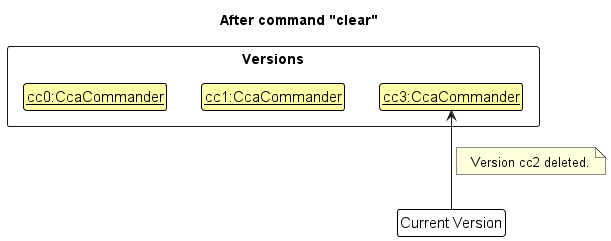
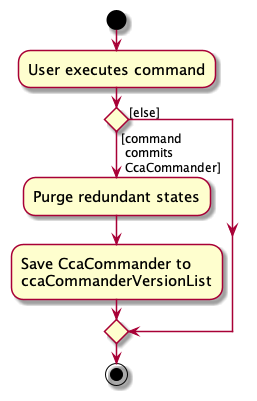
Step 6. The user executes clear, which calls Model#commit(String commitMessage). Since the versionPointer is not pointing at the end of the ccaCommanderVersionList, all CCACommander versions after the versionPointer will be purged. Reason: It no longer makes sense to redo the createMember n/David … command. This is the behavior that most modern desktop applications follow.
The following activity diagram summarizes what happens when a user executes a new command:
Design considerations:
Aspect: How undo & redo executes:
-
Alternative 1 (current choice): Saves the entire CCACommander.
- Pros: Easy to implement.
- Cons: May have performance issues in terms of memory usage.
-
Alternative 2: Individual command knows how to undo/redo by
itself.
- Pros: Will use less memory (e.g. for
deleteMember, just save the member being deleted). - Cons: We must ensure that the implementation of each individual command are correct.
- Pros: Will use less memory (e.g. for
Command History
Implementation
The proposed commandHistory mechanism is facilitated by CommandHistory. It contains commandHistoryList and currentCommandPointer. Additionally, it implements the following operations:
-
CommandHistory#hasPreviousCommand()— Returns if there is a previously command from the history based oncurrentCommandPointer. -
CommandHistory#hasNextCommand()— Returns if there is a next command from the history based oncurrentCommandPointer. -
CommandHistory#getPreviousCommand()— Restores the previous command from its history based oncurrentCommandPointer. -
CommandHistory#getNextCommand()— Restores the next command from its history based oncurrentCommandPointer. -
CommandHistory#addCommand()— Add the command into the history. -
CommandHistory#isLastCommandEqualCommand()— Returns if the command is equal to the last command added into thecommandHistoryList. -
CommandHistory#resetPointer()— Resets the pointer to be start from the most recent command again. -
CommandHistory#isLastCommand()— Returns ifcurrentCommandPointeris at the last command.
Given below is an example usage scenario and how the commandHistory behaves at each step.
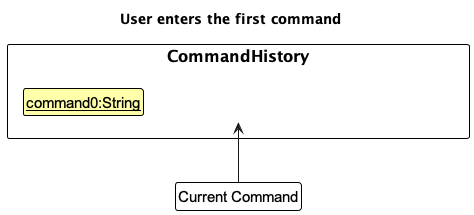
Step 1. The user launches the application for the first time and enters their first command.
The CommandHistory will save the command and the currentCommandPointer won’t be pointing to any command.
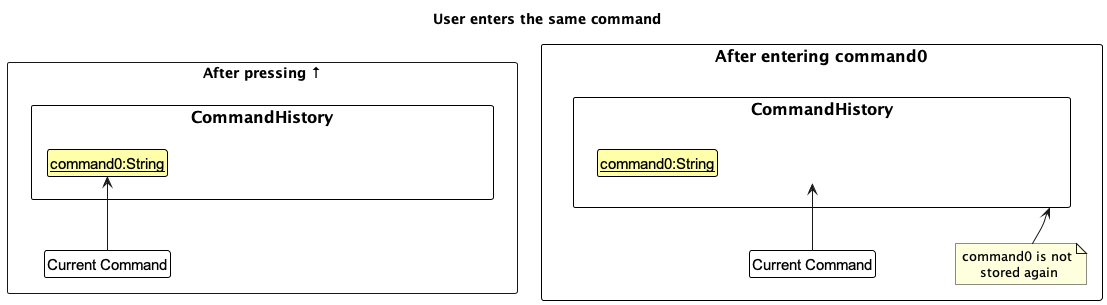
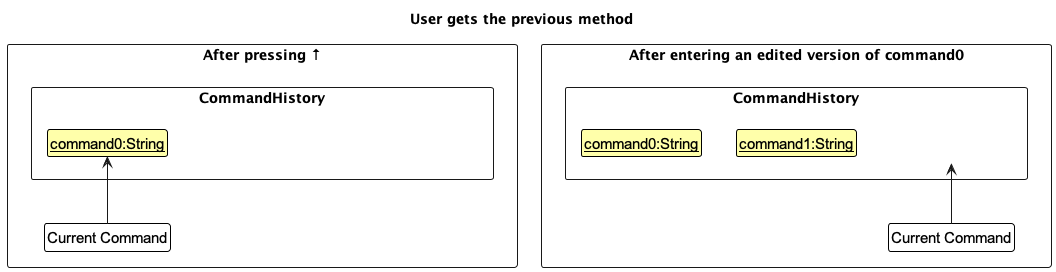
Step 2. The user presses ↑ while the commandBox is selected. CommandHistory#getPreviousCommand() is called and the previous command is displayed in the commandBox.
When the previous command is entered into the commandBox, the new version of command will not be stored in CommandHistory after calling CommandHistory#isLastCommandEqualCommand()
and it returns true.
Step 3. The user presses ↑ while the commandBox is selected. CommandHistory#getPreviousCommand() is called
and the previous command is displayed in the commandBox. When the previous command is edited and is entered into the commandBox, the newly edited version of command will be stored in CommandHistory after calling CommandHistory#addCommand().
Step 4. The user has pressed ↑ while selecting the commandBox until the first Command and CommandHistory#getPreviousCommand()
is called multiple times. The user then presses ↓ and CommandHistory#getNextCommand() is called and the command1 (the next command) will then be displayed in the commandBox.
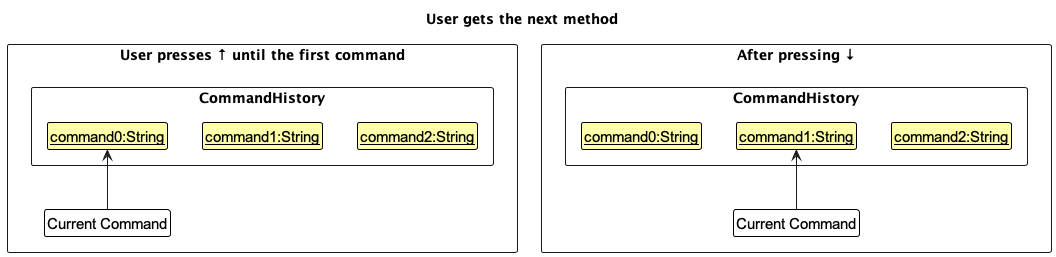
Note: If the currentCommandPointer is at
index 0, pointing to the initial first command, then there are no previous commands to restore. The program uses
CommandHistory#hasPreviousCommand() to check if this is the case. If so, it will not change anything.
The opposite occurs too when calling the next command — the program calls CommandHistory#hasNextCommand(), which shifts the currentCommandPointer once to the right, pointing to the previously entered command and displaying that command instead.
Note: If the commandHistoryPointer is at index commandHistoryList.size() - 1, pointing to nothing, then there are no commands to restore.
The program uses CommandHistory#hasNextCommand() to check if this is the case. If so, it will not call CommandHistory#getNextCommand()
but will instead use CommandHistory#isLastCommand() to check if the commandHistoryPointer is at the last command and set the commandBox to be blank.
The following activity diagram summarizes what happens to CommandHistory when a user enters a key in the commandBox:
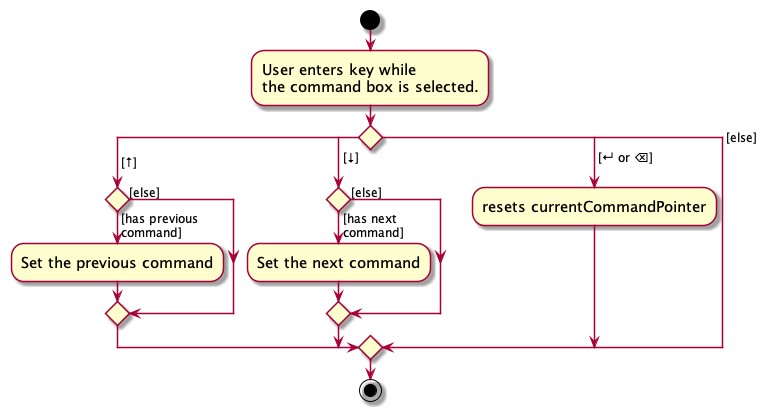
Design considerations:
Aspect: Storing of Command History:
-
Alternative 1 (current choice): Stores the list of all commands.
- Pros: Allows user to iterate through all commands listed.
- Cons: May have performance issues in terms of memory usage after prolonged usage.
-
Alternative 2: Command History only stores previous command.
- Pros: Will use less memory and reduces user error.
- Cons: Quite limited as a feature.
Planned Enhancements
Allow users to add / delete tags without retyping previous tags
Current Implementation:
-
Current Issue: Each member/event can have tags attached to it and these tags can be edited using the
editMember/editEventcommands. However, upon adding a new tag to a member/event without typing all the old tags, it will override the initial tags attached to the member/event and only the new tag will be displayed. This brings inconvenience to the user as the user has to type both the old and new tags instead of just typing the new tag. -
Example: We have a member called Alice with a member index of 1, and she has an initial tag called
friend. We want to add a new tagearlyto her. Upon entering the commandeditMember 1 t/early, the current implementation will override all the initial tags and only theearlytag will be displayed.
Proposed Solution:
We propose to enhance the editMember/editEvent commands to give the user the flexibility to choose one of the following options
when editing the tags of the member/event:
- Override the initial tags entirely where the new tags that the user enters will entirely replace all the old tags
- Add new tag to the list of old tags where the old tags will remain attached to the member/event with the addition of the new tags
- Edit current list of tags attached to the member/event
- Delete specific tags from the current list of tags attached to the member/event
Allow users to create and edit a member/event with name containing non-alphanumeric characters
Current Implementation:
- Current Issue: Member/event name only accepts alphanumeric characters and restricts the user from entering special characters into the member/event name, which should be allowed as member/event names can contain special characters.
-
Example: The user wants to create a new event named “Raffles Hall’s Musical Production” and the user enters
createEvent n/Raffles Hall's Musical Production l/Raffles Hall d/2023-09-19but the message “Names should only contain alphanumeric characters and spaces, and it should not be blank” is shown to the user instead of accepting it as a valid event. This is due to the presence of the special character'in the event name.
Proposed Solution:
We propose to allow the createMember, editMember , createEvent and editEvent commands to accept special
characters in the name field and not to be restricted to just alphanumeric characters.
Allow users to delete values from optional fields in member/event/enrolment
Current Implementation:
- Current Issue: Currently, there is no way for the user to delete unwanted values for optional fields in member/event/enrolment.
- Example: For example, if the user accidentally adds a remark to an enrolment, they are unable to remove it. The only way for the user to remove this unwanted remark is to delete the enrolment and add it again without the remark, which is highly inconvenient. This would be similar for the other optional fields in member and event.
Proposed Solution:
We propose to enhance the editMember, editEvent and editEnrolment commands to give the user the flexibility to remove
any unwanted values from the optional fields in member/event/enrolment. For instance, to remove the value from an optional field,
the user can provide an empty prefix e.g. if the user wishes to remove the phone number from the first member, they can do editMember 1 p/.
Make UI stay on current view upon editMember or editEvent
Current Implementation:
-
Current Issue: Currently, calling
editMemberoreditEventwill result in the listing of all events and members. -
Example: If the user is viewing a filtered list for example if they have just called
viewMember, if the user then edits a member or event usingeditMemberoreditEvent, all events and members will be displayed instead of their current filtered view. This will cause inconvenience for the user as they will have to relocate the edited member/event.
Proposed Solution:
We propose to change the behaviour of editMember and editEvent such that calling them will no longer list all members and events,
and instead remain on the user’s current view.
Show a more specific error message for negative index in editMember, editEvent, viewMember, viewEvent, deleteMember and deleteEvent
Current Implementation:
-
Current Issue: When the user inputs a negative index for the
editMember,editEvent,viewMember,viewEvent,deleteMemberordeleteEventcommands, the displayed error message is not specific enough and does not make it clear to the user that he/she has wrongly input a negative index. -
Example: The user enters the command
editMember -1 n/Jane Smithand the error message displayed is “Invalid command format!… Parameters: INDEX (must be a positive integer)…”. The current error message fails to highlight to the user the root cause of the error, which is a negative member index.
Proposed Solution:
We propose to make editMember, editEvent, viewMember, viewEvent, deleteMember and deleteEvent commands
display a more specific error message along the lines of “The provided index is negative and should be a positive integer
instead.” when the user inputs a negative index. In order to implement this, the relevant CommandParser classes have
to recognise negative indexes and throw more specific exceptions.
Provide more specific index error messages to the user
Current Implementation:
- Current Issue: As of now, for commands that accept more than 1 index as a parameter, it is hard to tell which index is wrong based on the index error message shown to the user if one of the indexes provided is wrong. This can hamper the user’s efficiency as the user cannot tell immediately which provided index is wrong.
-
Example: Commands such as
enrolaccept more than 1 index as a parameter. When the user accidentally enters an invalid index such asenrol m/1 e/-1where the event index is wrong, the error message displayed to the user is just “Index is not a non-zero unsigned integer.” There is a lack of information shown to the user which specific index is wrong.
Proposed Solution:
We propose to make the index error messages more specific and highlight to the user which index is wrong and why
that index is wrong. For example, in the enrol m/1 e/-1 input, we will show an error message to the user along
the lines of “The provided Event Index is not a non-zero unsigned integer.”
Improve findMember/findEvent criteria
Current Implementation:
-
Current Issue: As of now,
findMemberandfindEventcommands will only match the respective member and event if the name of the member or event contains a word that matches exactly the entire given find keyword. This means that the user will have to remember the entire name of theMemberorEventto find it, reducing the effectiveness offindMemberandfindEvent. -
Example:
findMember alexwill list a member with name “Alex Yeoh”, butfindMember alewill result in no member being listed.
Proposed Solution:
We propose that the find criteria will be improved such that it will find any event/member name which contains the given keyword string,
i.e. member/event name will not have to contain a word that matches exactly with the given find keyword. For example,
the command findMember a will now match members with name “Alex”, “Alice”, etc. In addition, if the user remembers that
an event name consists of 2 words, they can do findEvent , which would list all events which have a blank space in
their name.
Make UI stay on current view upon undo/redo
Current Implementation:
-
Current Issue: Currently, the
undoandredocommands will always result in all members and events being listed. -
Example: For example, if the user enrols a member to an event and views the member, before deciding to unenrol the member
from the event by executing the
undocommand, all the members and events would then be listed. This inconveniences the user as they will then have to execute theviewMembercommand again to see their changes.
Proposed Solution:
We propose to change the behaviour of undo and redo such that executing them will no longer list all members and events,
and instead remain on the user’s current view.
Provide specific error messages for unknown prefixes
Current Implementation:
-
Current Issue: Many of the commands require the use of prefixes in the input, such as
n/,g/,p/, etc. However, upon inputting an erroneous unknown prefix in the command input, the error message shown to the user is not accurate. The error message displayed will be based on the error message of the preceding prefix. -
Example: The user inputs the command
createMember n/Jane Smith g/Female q/testbut the error message displayed will not highlight that the unknownq/prefix was typed in. The error message displayed to the user will be “Gender should only be one of the following: Male, Female, or Others” which is based off the standard error message for gender prefixes, which happens to be the prefix preceding theq/prefix.
Proposed Solution:
We propose to display a more specific error message to the users if they input unknown prefixes. For example, if the user
provides the command, createMember n/Jane Smith g/Female q/test, an error message along the lines of “The
q/ prefix is not a correct prefix for this command.” will be displayed. This will involve us improving the relevant
CommandParser classes to properly sieve out cases of unknown prefixes being entered and throwing more
specific exceptions related to such issues.
Documentation, logging, testing, configuration, dev-ops
Appendix A: Requirements
Product scope
Target user profile:
- has a need to manage a significant number of CCA members and events
- prefer desktop apps over other types
- can type fast
- prefers typing to mouse interactions
- is reasonably comfortable using CLI apps
Value proposition: one stop app to manage CCA members and events faster than a typical mouse/GUI driven app
User stories
Priorities: High (must have) - * * *, Medium (nice to have) - * *, Low (unlikely to have) - *
| Priority | As a … | I can … | So that … |
|---|---|---|---|
* * * |
beginner user | create a new profile of a CCA member | I can keep track of their information |
* * * |
power user | delete the profile of a CCA member | I can remove them from the system when needed |
* * * |
beginner user | list all members in my CCA | I can keep track of my CCA strength |
* * * |
beginner user | add a new event hosted by the CCA | I can keep track of upcoming activities |
* * * |
power user | delete an event | I can remove it from the schedule |
* * * |
power user | view a list of all events hosted by the CCA | I can see event history |
* * * |
beginner user | add a member to an event | I can track which members are participating in the event |
* * * |
beginner user | remove a member from an event | I can amend adding the wrong member to an event |
* * * |
beginner user | view the members who have enrolled in an event | I can estimate the number of members who will enrol in similar events in the future |
* * * |
beginner user | view events of a member | I can check how involved that particular member is |
* * |
beginner user | recall the previous commands | I can enter similar commands quickly |
* * |
power user | undo a command | I can correct any wrong commands that I have entered previously |
* * |
power user | redo a command | I can correct any wrong undo commands that I have entered previously |
Future User Stories to be implemented:
| Priority | As a … | I can … | So that … |
|---|---|---|---|
* * |
power user | generate reports on the total hours spent by CCA Members for a specified period | I can assess their involvement |
* * |
power user | add multiple profiles for CCA Members in bulk | I can save time when onboarding new members |
* * |
power user | export attendance data for an event as a CSV file | I can use it for further analysis of which events are more popular |
* * |
long term user | archive/hide unused data | I will not be distracted by irrelevant data |
* * |
long term user | create custom templates for events | I can quickly set up recurring activities with predefined details |
* * |
long term user | create aliases for commands | I can save time on frequently performed commands |
* * |
beginner user | access a user-friendly help guide for exporting data in PDF/CSV format | I can share the data with other CCA Heads |
* |
power user | import data from an external source to update member profiles | I can keep information up-to-date |
Use cases
(For all use cases below, the System is the CCACommander and the Actor is the user, unless specified otherwise)
Use case: UC01 - Create a member
Guarantees: MSS -> Entered member will be added.
MSS
- User enters command to create a member.
-
CCACommander adds that member to the member list and displays the member added.
Use case ends.
Extensions
-
1a. User uses the command incorrectly.
-
1a1. CCACommander shows an error message.
Use case ends.
-
Use case: UC02 - Delete a member
Guarantees: MSS -> Specified member will be deleted.
MSS
- User requests to list all members (UC03).
- CCACommander shows a list of all members.
- User requests to delete a specific member in the list of all members.
-
CCACommander deletes the specific member.
Use case ends.
Extensions
-
3a. The given index is invalid.
- 3a1. CCACommander shows an error message and requests for a valid index from the user.
- 3a2. User enters new index.
-
Steps 3a1-3a2 are repeated until index given by the user is correct.
Use case resumes at step 4.
Use case : UC03 - List all members
Guarantees: MSS -> All members will be listed.
MSS
- User requests to list all members.
-
CCACommander lists all members in the CCA.
Use case ends.
Extensions
-
1a. The list of all members is empty.
-
1a1. CCACommander shows an empty member list.
Use case ends.
-
Use case : UC04 - List all events
Guarantees: MSS -> All events will be listed.
MSS
- User requests to list all events.
-
CCACommander lists all events in the CCA.
Use case ends.
Extensions
-
1a. The list of all events is empty.
-
1a1. CCACommander shows an empty event list.
Use case ends.
-
Use case: UC05 - View members of event
Guarantees: MSS -> All members of the specified event will be listed.
MSS
- User requests to list all events (UC04).
- CCACommander shows a list of all events.
- User requests to view a specific event in the list of all events.
-
CCACommander displays all members of the specified event.
Use case ends.
Extensions
-
3a. The given index is invalid.
-
3a1. CCACommander shows an error message.
Use case resumes at step 2.
-
Use case: UC06 - View events of member
Guarantees: MSS -> All events of the specified member will be listed.
MSS
- User requests to list all members (UC03).
- CCACommander shows a list of all members.
- User requests to view a specific member in the list of all members.
-
CCACommander displays all events of the specified member.
Use case ends.
Extensions
-
3a. The given index is invalid.
-
3a1. CCACommander shows an error message.
Use case resumes at step 2.
-
Use case: UC07 - Create an event
Guarantees: MSS -> Entered event will be added.
MSS
- User requests to add an event to the list.
-
CCACommander adds that event to the event list and displays the event added.
Use case ends.
Extensions
-
1a. User uses the command incorrectly.
-
1a1. CCACommander shows an error message.
Use case ends.
-
Use case: UC08 - Delete an event
Guarantees: MSS -> Specified event will be deleted.
MSS
- User lists all events (UC04).
- CCACommander shows a list of all events.
- User requests to delete a specific event in the list of all events.
-
CCACommander deletes the specific event.
Use case ends.
Use case: UC09 - Enrol member to an event
Guarantees: MSS -> Specified member will be enrolled to the event.
MSS
- User lists all members (UC03).
- CCACommander shows a list of all members.
- User lists all events (UC04).
- CCACommander shows a list of all events.
- User requests to enrol a specific member in the list of all members to a specific event in the list of all events.
-
CCACommander enrols the specified member from the specified event.
Use case ends.
Extensions
-
5a. The given index is invalid.
- 5a1. CCACommander shows an error message and requests for a valid index from the user.
- 5a2. User enters new index.
-
Steps 5a1-5a2 are repeated until index given by the user is correct.
Use case resumes at step 6.
-
5b. The specified member is already added to the event.
-
5b1. CCACommander shows an error message saying member is already in event.
Use case ends.
-
Use case: UC10 - Unenrol member from an event
Guarantees: MSS -> Specified member will be unenrolled from the event.
MSS
- User lists all members (UC03).
- CCACommander shows a list of all members.
- User lists all events (UC04).
- CCACommander shows a list of all events.
- User requests to unenrol a specific member in the list of all members to a specific event in the list of all events.
-
CCACommander unenrols the specified member to the specified event.
Use case ends.
Extensions
-
5a. The given index is invalid.
- 5a1. CCACommander shows an error message and requests for a valid index from the user.
- 5a2. User enters new index.
-
Steps 5a1-5a2 are repeated until index given by the user is correct.
Use case resumes at step 6.
-
5b. The specified member is not in the event.
-
5b1. CCACommander shows an error message saying member is not in event.
Use case ends.
-
Non-Functional Requirements
- Should work on any mainstream OS as long as it has Java
11or above installed. - Should be able to hold up to 1000 members without a noticeable sluggishness in performance for typical usage.
- Should be able to hold up to 1000 events without a noticeable sluggishness in performance for typical usage.
- A user with above average typing speed for regular English text (i.e. not code, not system admin commands) should be able to accomplish most of the tasks faster using commands than using the mouse.
Glossary
- CCA: Co-Curricular Activities
- CLI: Command Line Interface
- Data archiving: A feature related to data storage and archiving
- Event: An activity entity of the application
- Extensions: Variations or deviations from the main success scenario in a use case
- GUI: Graphical User Interface
- Jar file: A Java Archive file used to distribute and run Java applications
- Mainstream OS: Windows, Linux, Unix, OS-X
- Member: An individual entity of the application
- MSS: Main Success Scenario
- Non-Functional Requirements: Constraints under which system is developed and operated
- PlantUML: The tool or language used for creating diagrams in the documentation
- Sequence Diagram: A type of diagram used to visualize the sequence of interactions between components or objects
Appendix B: Instructions for manual testing
Given below are instructions to test the app manually.
Note: These instructions only provide a starting point for testers to work on;
testers are expected to do more exploratory testing.
Launch and shutdown
-
Initial launch
-
Download the jar file and copy into an empty folder
-
Double-click the jar file Expected: Shows the GUI with a set of sample members and events. The window size may not be optimum.
-
-
Saving window preferences
-
Resize the window to an optimum size. Move the window to a different location. Close the window.
-
Re-launch the app by double-clicking the jar file.
Expected: The most recent window size and location is retained.
-
Creating a member
- Successfully creating a member
- Test case:
createMember n/Andy Tan g/Male p/91234567 e/andytan@gmail.com a/10 Kent Ridge Crescent, Singapore 119278 t/logs
Expected: The new member is added to the last entry of the member list. Member details shown in the result display without gender. Command box is cleared. - For other positive test cases, try
createMemberwith a unique name, and any combination of optional fields with valid inputs.
Expected: Similar to previous.
- Test case:
- Unsuccessfully creating a member
- Prerequisite:
createMember n/Andy Tan g/Male p/91234567 e/andytan@gmail.com a/10 Kent Ridge Crescent, Singapore 119278 t/logshas been entered once before. - Test case:
createMember n/Andy Tan g/Male p/91234567 e/andytan@gmail.com a/10 Kent Ridge Crescent, Singapore 119278 t/logs
Expected: No member is added. Error details shown in the result display. Command box remains the same. - For other negative test cases, try to input invalid values into each field. For unacceptable values of each field, refer to the User Guide.
Expected: Similar to previous.
- Prerequisite:
Editing a member
- Successfully editing a member
- Prerequisites: List all members using the
listcommand. Multiple members in the list. - Test case:
editMember 1 p/90019001 e/newmail@gmail.com
Expected: Phone number and email of first member is edited. Details of member edited without gender shown in the result display. Command box is cleared. - For other positive test cases, try
editMemberwith a valid index and at least one field to edit with a valid input.
Expected: Similar to previous.
- Prerequisites: List all members using the
- Unsuccessfully editing a member
- Prerequisites:
- List all members using the
listcommand. Multiple members in the list. -
createMember n/Andy Tan g/Male p/91234567 e/andytan@gmail.com a/10 Kent Ridge Crescent, Singapore 119278 t/logshas been entered once before.
- List all members using the
- Test case:
editMember 1 n/Andy Tan
Expected: No member is edited. Error details shown in the result display. Command box remains the same. - Other incorrect
editMembercommands to try:editMember 1,editMemberwith valid index, but invalid values in fields to be edited (For invalid values of fields, refer to User Guide).
Expected: Similar to previous.
- Prerequisites:
Deleting a member
-
Successfully deleting a member
-
Prerequisites: List all members using the
listcommand. Multiple members in the list. -
Test case:
deleteMember 1
Expected: First member is deleted from the member list. Details of the deleted member without gender is shown in the result display. Command box is cleared.
-
-
Unsuccessfully deleting a member
- Prerequisites: List all members using the
listcommand. Multiple members in the list. -
Test case:
deleteMember 0
Expected: No member is deleted. Error details shown in the result display. Command box remains the same. - Other incorrect deleteMember commands to try:
deleteMember,deleteMember x(where x is larger than the list size)
Expected: Similar to previous.
- Prerequisites: List all members using the
Creating an event
- Successfully creating an event
- Test case:
createEvent n/Run l/NUS Track d/2023-09-20 t/Training
Expected: The new event is added to the last entry of the event list. Event details shown in the result display. Command box is cleared. - For other positive test cases, try
createEventwith a unique name, and any combination of optional fields.
Expected: Similar to previous.
- Test case:
- Unsuccessfully creating an event
- Prerequisite:
createEvent n/Run l/NUS Track d/2023-09-20 t/Traininghas been entered once before. - Test case:
createEvent n/Run l/NUS Track d/2023-09-20 t/Training
Expected: No event is added. Error details shown in the result display. Command box remains the same. - For other negative test cases, try to input invalid values into each field. For unacceptable values of each field, refer to the User Guide.
Expected: Similar to previous.
- Prerequisite:
Editing an event
- Successfully editing an event
- Prerequisites: List all events using the
listcommand. Multiple events in the list. - Test case:
editEvent 1 l/Pioneer House d/2023-10-25
Expected: Location and date of first event is edited. Details of event edited shown in the result display. Command box is cleared. - For other positive test cases, try
editEventwith a valid index and at least one field to edit with a valid input.
Expected: Similar to previous.
- Prerequisites: List all events using the
- Unsuccessfully editing an event
- Prerequisites:
- List all events using the
listcommand. Multiple events in the list. -
createEvent n/Run l/NUS Track d/2023-09-20 t/Traininghas been entered once before.
- List all events using the
- Test case:
editEvent 1 n/Run
Expected: No event is edited. Error details shown in the result display. Command box remains the same. - Other incorrect editEvent commands to try:
editEvent 1,editEventwith valid index, but invalid values in fields to be edited (For invalid values of fields, refer to User Guide).
Expected: Similar to previous.
- Prerequisites:
Deleting an event
-
Successfully deleting an event
-
Prerequisites: List all events using the
listcommand. Multiple events in the list. -
Test case:
deleteEvent 1
Expected: First event is deleted from the event list. Details of the deleted event is shown in the result display. Command box is cleared.
-
-
Unsuccessfully deleting an event
- Prerequisites: List all events using the
listcommand. Multiple events in the list. -
Test case:
deleteEvent 0
Expected: No event is deleted. Error details shown in the result display. Command box remains the same. - Other incorrect deleteEvent commands to try:
deleteEvent,deleteEvent x(where x is larger than the list size)
Expected: Similar to previous.
- Prerequisites: List all events using the
Enrolling a member to an event
- Successfully enrolling a member to an event
- Prerequisites: List all members and events using the
listcommand. Multiple members and events in the list. - Test case:
enrol m/1 e/1 h/3 r/Role: Social Media Manager
Expected: First member is enrolled to first event. Enrolment details shown in the result display. Command box is cleared. - For other positive test cases, try
enrolwith a valid member and event indexes, and any combination of optional fields.
Expected: Similar to previous.
- Prerequisites: List all members and events using the
- Unsuccessfully enrolling a member to an event
- Prerequisites: List all members and events using the
listcommand. Multiple members and events in the list. - Prerequisite:
enrol m/1 e/1 h/3 r/Role: Social Media Managerhas been entered once before. - Test case:
enrol m/1 e/1 h/3 r/Role: Social Media Manager
Expected: No new enrolment created. Error details shown in the result display. Command box remains the same. - For other negative test cases, try to input invalid values into each field. For unacceptable values of each field, refer to the User Guide.
Expected: Similar to previous.
- Prerequisites: List all members and events using the
Editing an enrolment
- Successfully editing an enrolment
- Prerequisites: List all members and events using the
listcommand. Multiple members and events in the list. -
Prerequisite:
enrol m/1 e/1 h/3 r/Role: Social Media Managerhas been entered once before. - Test case:
editEnrolment m/1 e/1 h/5 r/Role: Project Director
Expected: Number of hours and remark of the enrolment of first member to first event is edited. Details of enrolment edited shown in the result display. Command box is cleared. - For other positive test cases, try
editEnrolmentwith a valid index and at least one field to edit with a valid input.
Expected: Similar to previous.
- Prerequisites: List all members and events using the
- Unsuccessfully editing an enrolment
- Prerequisites: List all members and events using the
listcommand. Multiple members and events in the list. - Test case:
editEnrolment m/1 e/0
Expected: No enrolment is edited. Error details shown in the result display. Command box remains the same. - For other negative test cases, try to input invalid values into each field. For unacceptable values of each field, refer to the User Guide.
Expected: Similar to previous.
- Prerequisites: List all members and events using the
Unenrolling a member from an event
-
Successfully unenrolling a member from an event
- Prerequisites:
1.List all events using the
listcommand. Multiple events in the list.-
enrol m/1 e/1 h/3 r/Role: Social Media Managerhas been entered once before.
-
- Test case:
unenrol m/1 e/1
Expected: First member is unenrolled from the first event. Details of the deleted enrolment is shown in the result display. Command box is cleared.
- Prerequisites:
1.List all events using the
-
Unsuccessfully unenrolling a member from an event
- Prerequisites: List all events using the
listcommand. Multiple events in the list. -
Test case:
unenrol m/0 e/0
Expected: No enrolment is deleted. Error details shown in the result display. Command box remains the same. - For other negative test cases, provide invalid indexes for member index or event index.
Expected: Similar to previous.
- Prerequisites: List all events using the
Viewing a member
- Successfully viewing a member
- Prerequisites: List all members using the
listcommand. Multiple members in the list. - Test case:
viewMember 1
Expected: Event list updated with events of first event. Details of viewed member is shown in the result display. Command box is cleared.
- Prerequisites: List all members using the
-
Unsuccessfully viewing a member
- Prerequisites: List all members using the
listcommand. Multiple members in the list. -
Test case:
viewMember 0
Expected: No member is viewed. Error details shown in the result display. Command box remains the same. - Other incorrect viewMember commands to try:
viewMember,viewMember x(where x is larger than the list size)
Expected: Similar to previous.
- Prerequisites: List all members using the
Viewing an event
- Successfully viewing an event
- Prerequisites: List all events using the
listcommand. Multiple events in the list. - Test case:
viewEvent 1
Expected: Member list updated with members of first event. Details of viewed event is shown in the result display. Command box is cleared.
- Prerequisites: List all events using the
-
Unsuccessfully viewing an event
- Prerequisites: List all events using the
listcommand. Multiple events in the list. -
Test case:
viewEvent 0
Expected: No event is viewed. Error details shown in the result display. Command box remains the same. - Other incorrect viewEvent commands to try:
viewEvent,viewEvent x(where x is larger than the list size)
Expected: Similar to previous.
- Prerequisites: List all events using the
Find a member
- Successfully finding a member
- Test case:
findMember Andy
Expected: Member list updated with all members with name matching the word “Andy”. Number of members with name “Andy” shown in the result display. Command box is cleared.
- Test case:
- Unsuccessfully finding a member
- Test case:
findMember
Expected: Member list is not updated. Error details shown in the result display. Command box remains the same.
- Test case:
Find an event
- Successfully finding an event
- Test case:
findEvent Training
Expected: Event list updated with all events with name matching the word “Training”. Number of events with name “Training” shown in the result display. Command box is cleared.
- Test case:
- Unsuccessfully finding an event
- Test case:
findEvent
Expected: Event list is not updated. Error details shown in the result display. Command box remains the same.
- Test case:
Undo
- Successfully undo a command
- Prerequisite: The last command to be successfully executed is a command that can be undone (View User Guide for list of commands that can be undone).
- Test case:
undo
Expected: Previous state before the last command executed will be restored. Command that was undone shown in the result display. Command box is cleared.
- Unsuccesfully undo a command
- Prerequisite: No command that can be undone has been previously executed.
- Test case:
undo
Expected: No command is undone. Error details shown in the result display. Command box remains the same.
Redo
- Successfully redo a command
- Prerequisite: The last command to be successfully executed is
undo. - Test case:
redo
Expected: Previous state before theundowill be restored. Command that was redone shown in the result display. Command box is cleared.
- Prerequisite: The last command to be successfully executed is
- Unsuccesfully redo a command
- Prerequisite: The last command to be successfully executed is a command that can be undone (View User Guide for list of commands that can be undone).
- Test case:
redo
Expected: No command is redone. Error details shown in the result display. Command box remains the same.
Appendix C: Effort
Challenges
- Hard-to-fix bug where UI did not update upon data change
- Implementation of
viewMember/viewEvent - Design of
Enrolmentclass
Effort Required and Difficulty:
- 3 entity types compared to AB3’s 1 entity type
- 5 new data type (Date, Gender, Location, Remark, Hours)
- 11 new commands (AB3 only had 8 commands of which 4 we updated - not included in the 11)
- Updated most data types to be optional
- Added a class (Enrolment) to relate 2 classes (Member & Event) - new feature not in AB3
- Updated UI to accommodate to members and events - 2 list panels compared to 1 in AB3
- Added new command history feature which allows users to recall commands similar to a terminal
- Added new theme-switching feature
Achievements:
- Added user-friendly features:
- Command History
- Undo/Redo
- Added personalisation feature:
- Theme switching
- Related 2 classes together using the
Enrolmentclass - Updated UI to display all required information